Debugging the Bridge: Six MCP Fixes for Claude Desktop
A technical deep-dive into diagnosing and resolving Model Context Protocol (MCP) connection failures between Claude Desktop and LAP::CORE. Six hours of debugging distilled into six critical fixes that illuminate the subtle contract requirements of the MCP specification—and now serve as the blueprint for the MCP Preflight Validator.
Table of Contents
The Players
Architect Kevin on point. PEBKAC.
Special Field Agent Chuck - riding Anthropic Claude Sonnet 4.5 via Claude Desktop and VS Code.
Special Field Agent Marvin2 - riding Alibaba Qwen/Qwen2.5-Coder-3B-Instruct on vLLM via ACE::COMMS_CHANNEL.
The Problem Space
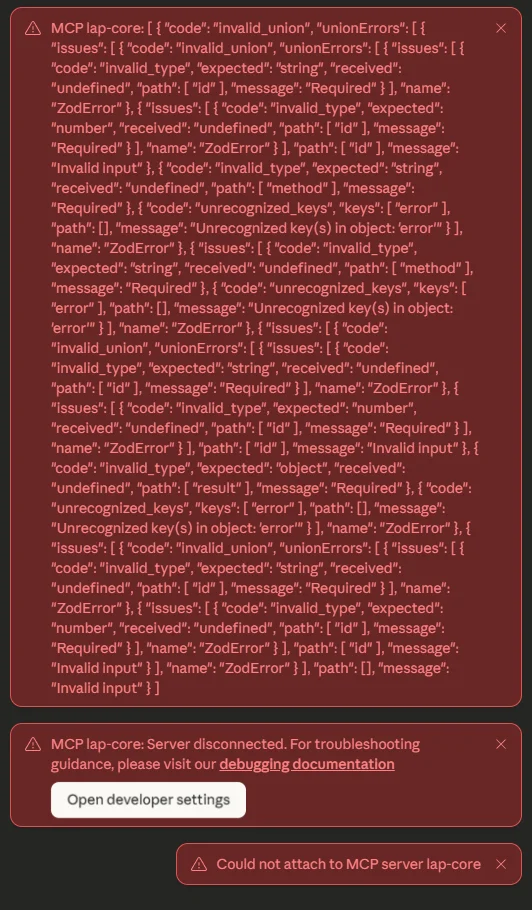
When building LAP::CORE's MCP server to expose our internal telemetry and operations platform to Claude Desktop, we encountered a deceptively simple failure mode: the server would start, the stdio transport would connect, but no tools would appear in Claude Desktop's interface. The logs showed connection establishment, but complete silence on tool discovery.
This is the worst kind of bug—no error messages, no exceptions, just absence. The MCP protocol's stdio transport is particularly challenging to debug because it multiplexes JSON-RPC over stdin/stdout, meaning any stray log output or protocol violation creates silent failures.
The Environment
Our debugging environment added layers of complexity:
- Windows 11 Pro running Claude Desktop
- WSL2 Ubuntu hosting the Python MCP server
- Poetry managing Python dependencies
- Docker Compose running supporting infrastructure
- MCP Protocol 2024-11-05 specification compliance
The Windows-to-WSL2 bridge meant every invocation required careful PATH and environment management, and the stdio transport meant debugging had to happen entirely through log files—no interactive debugging possible.
The Six Fixes
Fix #1: Tool Names Must Match Zod Validation Pattern
The Problem: Our tool names included dots, like lap.health.ping. While dots are common in namespace conventions, the MCP specification enforces strict naming via Zod schema validation using the pattern ^[a-zA-Z0-9_-]{1,64}$.
The Symptom: Tools were silently rejected during the tools/list request. Claude Desktop received the tool list but validation failed before tools could be registered.
The Solution: Renamed all tools to use underscores: lap_health_ping, lap_core_status, etc.
// Before - FAILS validation
{
  "name": "lap.health.ping",
  "description": "..."
}

// After - PASSES validation
{
  "name": "lap_health_ping",
  "description": "..."
}
Fix #2: Schema Properties Must Be Objects, Not Arrays
The Problem: Our initial implementation used "properties": [] for tools with no parameters. While Python's type system is forgiving, JSON Schema strictly requires properties to be an object type.
The Symptom: Schema validation failures in Claude Desktop, though the error was swallowed silently rather than surfaced to logs.
The Solution: Changed empty properties arrays to empty objects:
// Before - Invalid JSON Schema
{
  "inputSchema": {
    "type": "object",
    "properties": []  // ❌ Wrong type
  }
}

// After - Valid JSON Schema
{
  "inputSchema": {
    "type": "object",
    "properties": {}  // ✅ Correct type
  }
}
Fix #3: MCP Requires Content Wrapper in Responses
The Problem: The MCP specification requires all tool responses to be wrapped in a specific structure: {"content": [{"type": "text", "text": "..."}]}. We were returning raw response data, assuming the framework would handle wrapping.
The Symptom: Tools would execute successfully on the server side, but Claude Desktop would treat responses as invalid and not display results.
The Solution: Added a wrapper function in the dispatcher:
def _wrap_mcp_content(result: Any) -> dict:
    """Wrap tool results in MCP content structure."""
    if isinstance(result, dict) and "content" in result:
        return result  # Already wrapped

    # Convert result to string and wrap
    text = json.dumps(result) if not isinstance(result, str) else result
    return {
        "content": [{
            "type": "text",
            "text": text
        }]
    }
Fix #4: Notification Handlers Must Return Empty String
The Problem: MCP uses JSON-RPC notifications (requests without IDs) for lifecycle events like notifications/initialized. Our dispatcher was treating these as errors when no handler was found, returning error responses for notification requests.
The Symptom: Connection would establish but immediately disconnect as Claude Desktop received error responses to its initialization notifications.
The Solution: Added explicit notification detection and empty string return:
async def dispatch(self, request: dict) -> str:
    """Dispatch MCP request to appropriate handler."""

    # Check if this is a notification (no "id" field)
    if "id" not in request:
        # Notifications don't expect responses
        return ""

    # Regular request-response handling...
    method = request.get("method")
    # ...
Fix #5: Stdio Transport Requires Pure JSON-RPC on Stdout
The Problem: The MCP stdio transport is extremely sensitive to stdout pollution. Any debug logs, print statements, or error messages to stdout break JSON-RPC parsing and cause silent connection failures.
The Symptom: Server would appear to start successfully, but Claude Desktop would disconnect immediately. Debugging was nearly impossible because we couldn't see what was happening.
The Solution: Redirected all stderr to a log file in the launch command:
// claude_desktop_config.json
{
  "mcpServers": {
    "lap-core": {
      "command": "wsl",
      "args": [
        "-e", "bash", "-c",
        "exec 2>/tmp/lap-mcp-stderr.log; source ~/.profile && cd ~/projects/lap_core && /home/kbroder/.local/bin/poetry run lap-mcp-stdio"
      ]
    }
  }
}
The exec 2>> syntax ensures stderr redirection happens before any Python code runs, catching even early import errors.
Fix #6: JSON-RPC Responses Must Keep id and jsonrpc
The Problem: Later deployments started using convenience helpers like Pydantic’s model_dump_json(exclude_none=True) or manual response.pop("id") cleanup. Those helpers remove "id" when it is null, violating the JSON-RPC 2.0 spec and causing Claude Desktop to reject otherwise valid responses.
The Symptom: Tool execution logs looked perfect, but the client silently dropped responses because required headers vanished when id was null.
The Solution: Never exclude "id" or "jsonrpc"; only gate result vs. error. Our Preflight Validator now checks for both exclude_none=True patterns and explicit .pop("id")/.pop("jsonrpc") calls.
# ✅ Keep id/jsonrpc even when None
payload = {
    "jsonrpc": "2.0",
    "id": request.id,
    "result": data,
}
return payload

# ❌ This removes id/jsonrpc
return payload.model_dump_json(exclude_none=True)
The WSL2 Complexity Layer
Running the MCP server in WSL2 while Claude Desktop runs on Windows added several subtle complications:
~/.local/bin, but non-interactive WSL shells don't source ~/.profile by default. We had to explicitly source the profile and use absolute paths to the Poetry binary.
http.py in our codebase created circular import issues with Python's standard library http module. Renaming to http_utils.py resolved it.
export VAR=value and VAR=value in bash scripts caused environment variables to not propagate to Poetry-managed processes.
Validation Strategy
The key to debugging this was building test harnesses at each layer:
- Unit Tests: Validated individual tool handlers returned correct data structures
- MCP Compliance: Tested raw JSON-RPC requests/responses against the specification
- Stdio Transport: Verified no stdout pollution using captured output tests
- End-to-End: Connected via Claude Desktop and verified tool discovery and execution
Each layer required its own testing approach because the stdio transport made traditional debugging impossible.
The Working Configuration
lap_health_ping- Liveness checklap_core_status- Platform status (3 scopes)prom_query_instant- Prometheus instant queryprom_query_range- Prometheus range querycaddy_admin_reload- Caddy reload (OPA-protected)
Lessons for MCP Implementers
If you're implementing an MCP server, pay close attention to:
- Tool name validation: Stick to
[a-zA-Z0-9_-]only - Schema correctness: Properties must be objects, not arrays
- Response wrapping: Always use the MCP content structure
- Notification handling: Return empty strings for notifications
- Stdio hygiene: Absolutely nothing but JSON-RPC on stdout
- JSON-RPC headers: Never remove
idorjsonrpcfrom responses
The MCP specification is precise, but the error modes are subtle. Silent failures are the norm, not the exception.
Reference Implementation
Our full implementation is available at github.com/SyzygySys/lap_core in the feat/sse_mcp branch. Key files:
src/lap_core/mcp/tools.py- Tool definitions with correct schemassrc/lap_core/mcp/dispatcher.py- Request routing with notification handlingsrc/lap_core/mcp/mcp_stdio.py- Stdio transport implementation
Community Contribution
We've documented these fixes on the relevant GitHub issues and created a companion tool, preflight-tools, to validate MCP servers before deployment. The validator now checks all six of these common issues automatically.
Debugging Addendum
Debugging MCP servers in our Windows + WSL2 + Poetry environment requires multiple tools. Here's our quick-reference guide for common debugging scenarios.
Poetry Debug
Check Poetry environment and dependencies:
# Show which Poetry is running and where
which poetry
poetry --version

# Show virtual environment info
poetry env info

# List installed packages
poetry show

# Verify a specific package
poetry show fastapi

# Run with verbose output
poetry run -vvv lap-mcp-stdio
FastAPI Debug Mode
Enable detailed logging and auto-reload:
# In your FastAPI startup
import uvicorn

if __name__ == "__main__":
    uvicorn.run(
        "app:app",
        host="0.0.0.0",
        port=8000,
        reload=True,        # Auto-reload on code changes
        log_level="debug"   # Verbose logging
    )

# Or from command line
poetry run uvicorn app:app --reload --log-level debug
Python DevTools
Rich debugging output for development:
# Install devtools
poetry add --group dev devtools

# Use in code
from devtools import debug

# Pretty-print any object
debug(my_complex_object)

# Set breakpoints
import pdb; pdb.set_trace()  # Python debugger

# Or use IPython for better REPL
import IPython; IPython.embed()
Claude Desktop Logs (Windows)
Access Claude Desktop application logs:
# View logs in real-time (PowerShell)
Get-Content "$env:APPDATA\Claude\logs\mcp*.log" -Wait -Tail 50

# Search logs for errors
Select-String -Path "$env:APPDATA\Claude\logs\*.log" -Pattern "error|failed"

# View specific MCP server logs
Get-Content "$env:APPDATA\Claude\logs\mcp-server-lap-core.log"
Claude Desktop Config Inspection
Read and validate your MCP server configuration:
# View config as formatted JSON (PowerShell)
Get-Content "$env:APPDATA\Claude\claude_desktop_config.json" | ConvertFrom-Json | ConvertTo-Json -Depth 10

# Or just view raw
Get-Content "$env:APPDATA\Claude\claude_desktop_config.json"

# Example valid config
{
  "mcpServers": {
    "lap-core": {
      "command": "wsl",
      "args": [
        "-e", "bash", "-c",
        "exec 2>/tmp/lap-mcp-stderr.log; source ~/.profile && cd ~/projects/lap_core && poetry run lap-mcp-stdio"
      ]
    }
  }
}
MCP Server Direct Testing
Test MCP tools directly without Claude Desktop:
# Test a tool call with verbose output
cd ~/projects/lap_core

# Send JSON-RPC request to stdin, capture stderr
echo '{"jsonrpc":"2.0","id":1,"method":"tools/call","params":{"name":"lap_health_ping","arguments":{}}}' | \
  poetry run lap-mcp-stdio 2>&1 | head -20

# Expected output:
[STDIO] Authenticated as: chuck@field.agent
[STDIO] Ready to accept MCP requests
[STDIO] Request: tools/call (id=1)
[STDIO]   Tool: lap_health_ping
[STDIO]   Args: {}
[STDIO] Response JSON: {"jsonrpc":"2.0","id":1,"result":{"ok":true,"ts":1762542458}}
{"jsonrpc":"2.0","id":1,"result":{"ok":true,"ts":1762542458}}
[STDIO] Response sent

# Test the initialize handshake
echo '{"jsonrpc":"2.0","id":1,"method":"initialize","params":{"protocolVersion":"2024-11-05","capabilities":{},"clientInfo":{"name":"test","version":"1.0"}}}' | \
  poetry run lap-mcp-stdio 2>&1
Check for Hidden Characters
Detect invisible characters that break JSON parsing:
# Use xxd to show hex dump of config file
xxd "$APPDATA\Claude\claude_desktop_config.json" | head -20

# Expected output (clean JSON):
00000000: 7b0a 2020 226d 6370 5365 7276 6572 7322  {.  "mcpServers"
00000010: 3a20 7b0a 2020 2020 226c 6170 2d63 6f72  : {.    "lap-cor
00000020: 6522 3a20 7b0a 2020 2020 2020 2263 6f6d  e": {.      "com
00000030: 6d61 6e64 223a 2022 7773 6c22 2c0a 2020  mand": "wsl",.

# Look for:
# - BOM markers (ef bb bf at start)
# - Non-breaking spaces (c2 a0 instead of 20)
# - Carriage returns in wrong places (0d 0a vs 0a)

# In WSL bash, check server output
cd ~/projects/lap_core
poetry run lap-mcp-stdio < /dev/null 2>&1 | xxd | head -20
Stderr Redirection Check
Verify stderr is properly redirected (critical for stdio):
# Test that stderr goes to file, not stdout
cd ~/projects/lap_core

# This should show NO stderr output, only JSON
echo '{"jsonrpc":"2.0","id":1,"method":"tools/list"}' | \
  bash -c "exec 2>/tmp/test-stderr.log; poetry run lap-mcp-stdio"

# Check the stderr log
cat /tmp/test-stderr.log

# Should contain debug messages like:
# [STDIO] Ready to accept MCP requests
# [STDIO] Request: tools/list (id=1)
WSL2 Path Debugging
Diagnose PATH and environment issues in WSL2:
# Check what Poetry sees in non-interactive shell
wsl -e bash -c 'echo $PATH'

# vs interactive shell
wsl -e bash -l -c 'echo $PATH'

# Source profile explicitly
wsl -e bash -c 'source ~/.profile && echo $PATH'

# Find where Poetry installed things
wsl -e bash -c 'source ~/.profile && which poetry'
# Should show: /home/username/.local/bin/poetry

# Test full command as Claude Desktop runs it
wsl -e bash -c "exec 2>/tmp/test.log; source ~/.profile && cd ~/projects/lap_core && poetry run lap-mcp-stdio --version"
Common Debugging Patterns
When debugging MCP connections, work through these layers systematically:
- Syntax: Check config JSON for hidden characters with
xxd - Environment: Verify PATH and Poetry location in WSL2
- Isolation: Test MCP server directly with echo + stdin
- Transport: Confirm stderr redirection is working
- Protocol: Validate tool schemas and response formats
- Integration: Check Claude Desktop logs for connection attempts
Each layer builds on the previous. Don't skip straight to integration testing—the lower layers often reveal the root cause faster.
| Aspect | Detail |
|---|---|
| Theme | Protocol debugging and specification compliance |
| Outcome | LAP::CORE MCP server fully operational with 7 working tools |
| Artifacts | Working MCP implementation + preflight-tools validator |
| Duration | 6 hours of intensive debugging |
| Status | ✅ Production ready; documentation published |
We hope this helps. — Team Syzygysys.io